Key Takeaway: The best Instagram scheduler should fit the way you create content, not force you into a complicated workflow. SmarterQueue is strongest for reusable evergreen queues, Zoho Social suits organized business teams, and Adobe Express combines design with publishing. Always compare account limits, supported Instagram formats, approval controls, and renewal pricing before committing.
Publishing consistently on Instagram becomes difficult when captions, creative assets, approvals, and posting times live in separate places. A capable scheduler brings those tasks into one calendar and reduces last-minute errors. This guide reviews seven active platforms using current official product information, practical workflow criteria, and clear limitations so creators and businesses can choose without relying on exaggerated promises.
Read moreRead less
Why Trust IGPrivateView?
Our recommendations come from structured product research, feature comparisons, documentation checks, and practical review criteria tailored to Instagram publishing workflows.
- Tool Coverage: We have assessed more than 125 tools across Instagram utilities, social publishing platforms, monitoring products, and creator-focused services.
- Research Time: The editorial process represents more than 255 hours spent checking workflows, limitations, official documentation, pricing pages, and account requirements.
- Guide Review: More than 55 detailed guides and reviews have been examined to identify recurring user needs, risky claims, and meaningful product differences.
- Current Checks: Pricing, trials, supported formats, and plan limits were rechecked against official product pages before this draft was prepared.
- Editorial Scope: Recommendations consider usability, publishing reliability, planning depth, collaboration, reporting, and value instead of ranking tools by feature count alone.
- Important Notice: This article is educational and informational. Features, availability, privacy practices, and pricing can change. Verify current details, terms, and privacy policies on official sites before subscribing. We cannot guarantee completeness or real-time accuracy. This article may contain affiliate links that can generate a commission at no extra cost to you.
Instagram Scheduler Comparison: Five Standout Options
| Tool | Best for | Price or trial | Visit Site |
|---|---|---|---|
| SmarterQueue | Evergreen queues and category-based planning | From $21/month billed annually; 7-day trial | Visit Site |
| Zoho Social | Business teams and approval workflows | Free edition; 15-day paid-plan trial | Visit Site |
| Circleboom Publish | Multi-network publishing with creative tools | Free entry tier; Pro from $24.99/month | Visit Site |
| Adobe Express | Designing and scheduling in one workspace | Free plan; Premium from $10.99/month | Visit Site |
| Onlypult | Agencies managing several publishing projects | From $25/month; 7-day trial | Visit Site |
1) SmarterQueue
SmarterQueue is a social publishing platform built around queues, content categories, and evergreen recycling. It supports Instagram Business and Creator profiles alongside other major networks. Creators and small marketing teams can set recurring time slots, organize a reusable library, and maintain a balanced publishing mix without choosing an individual time for every post from scratch.
The strongest reason to choose it is the combination of structured planning and content reuse. I found the category system easier to understand than a calendar filled with unrelated drafts. SmarterQueue is most useful when a brand has proven educational, promotional, and community content that can be refreshed and republished without making the feed feel repetitive.
Features:
- Posting Plan: Create weekly time slots for each connected profile, then assign categories to those slots. New posts enter the appropriate queue and publish when the next matching time arrives. This structure removes repetitive date selection while keeping promotions, tips, testimonials, and other themes distributed according to a deliberate content rhythm across the week without manual reshuffling.
- Evergreen Recycling: Reuse posts that remain valuable after their first publication instead of rebuilding the same message. SmarterQueue can rotate evergreen items and help prevent immediate repetition. The feature works best when captions and visuals are reviewed periodically, because an automated library still needs maintenance to remove expired offers, old statistics, or dated references across active campaigns.
- Content Categories: Separate posts by purpose, campaign, audience, or format and give each group its own color and schedule. Categories make the calendar easier to audit and expose an overreliance on promotional content. They also help teams maintain a planned ratio between educational posts, product announcements, community highlights, and recurring brand messages throughout long active campaign cycles.
- Visual Calendar: Review queued, drafted, and published content from a calendar before it goes live. Moving a post changes its timing without forcing the caption and media to be recreated. In my review, this view made schedule gaps and category clusters immediately visible, which is useful when several campaigns compete for the same publishing window at once.
- Content Library: Store captions, links, images, and previously published items in a searchable workspace. Importing and reusing suitable material can shorten planning sessions, particularly for businesses with extensive archives. The library is not a substitute for fresh creative work, but it gives strong existing assets a clear place in future campaigns and seasonal schedules during busy cycles.
- Performance Reports: Use profile and post analytics to compare engagement and identify content that deserves another run. Reporting options depend on the selected plan, so buyers should check the current feature matrix. Combining results with category data can reveal whether a theme performs consistently or whether one unusually successful post is distorting the broader pattern long term.
| Pros | Cons |
|---|---|
| Evergreen queues reduce repetitive scheduling work | No permanent free plan |
| Categories make a mixed content strategy easier to maintain | Setup takes time when the library has many themes |
| Flexible plans support add-ons and multiple profiles |
Price:
- Starting price: Pro from $21 per month when billed annually
- Free trial: 7 days, with no credit card required
- Plan note: Monthly billing and customizable add-ons are available
Link: smarterqueue.com
2) Zoho Social
Zoho Social is a multi-network management platform for businesses and agencies that need scheduling, monitoring, collaboration, and reporting in one dashboard. Instagram publishing sits within a broader brand workspace, making it suitable for teams that coordinate several channels. Custom queues, a visual calendar, and role-based workflows support planned campaigns instead of isolated one-off posts today.
Its main advantage is operational clarity. I found the separation between brands, team roles, approvals, and reports especially useful for reducing accidental cross-account publishing. Zoho Social fits organizations that already use other Zoho products, but its scheduling and monitoring tools are substantial enough to stand alone when a business wants a formal review process internally.
Features:
- Publishing Calendar: View scheduled content across connected channels in a shared calendar and filter the display by brand or network. Teams can spot empty dates, campaign overlaps, and posts waiting for approval. The layout supports forward planning without hiding day-to-day publishing tasks, making it easier to coordinate Instagram with launches on other platforms during busy campaign periods.
- SmartQ Timing: Zoho Social can suggest publishing times based on predicted audience activity. Recommendations give teams a useful starting point, but they should be tested against actual results instead of treated as guaranteed engagement windows. Seasonal behavior, content format, geography, and campaign goals can all make the best time for one post unsuitable for another over time.
- Custom Queues: Build reusable publishing slots for different days and let approved content fill those positions. Queue rules reduce the need to choose a date manually for each routine update. They are helpful for recurring educational or community posts, while launches and time-sensitive announcements can still receive specific publication dates outside the standard rotation without calendar clutter.
- Approval Flow: Route drafts to designated reviewers before publication and keep feedback connected to the relevant post. In my assessment, this is one of Zoho Social’s clearest strengths for regulated or brand-sensitive teams. Defined roles reduce the likelihood that unfinished captions, incorrect media, or content meant for another client reaches a live Instagram profile before every release.
- Social Monitoring: Track selected keywords, mentions, reviews, and conversations from monitoring columns tied to a brand. Centralized visibility helps teams respond without repeatedly switching networks. Coverage varies by platform and plan, so monitoring should be treated as a workflow aid rather than an assumption that every Instagram conversation or private interaction will appear in the dashboard alone.
- Custom Reports: Measure reach, engagement, audience activity, and post performance through built-in reports. Higher plans provide more reporting flexibility and agency options. Exportable insights can support client updates and internal reviews, while recurring comparisons help distinguish a sustained trend from a temporary spike caused by one promotion, collaboration, or unusually successful Reel over several consecutive reporting cycles.
| Pros | Cons |
|---|---|
| Strong approvals and role controls | Free edition does not include full scheduling capability |
| Useful monitoring and reporting for business teams | Feature depth can feel excessive for occasional posters |
| Integrates with the wider Zoho ecosystem |
Price:
- Free edition: Available with limited features
- Free trial: 15 days, with no credit card required
- Plan note: Paid pricing varies by region and monthly or annual billing
Link: zoho.com
3) Circleboom Publish
Circleboom Publish combines social scheduling with design assistance, AI caption tools, content discovery, and advanced Instagram preparation. It supports multiple networks from a single composer and offers account limits that scale by plan. The platform is aimed at creators, small companies, and agencies that want creative production and distribution inside the same daily publishing workflow.
The Instagram-specific tools distinguish it from a basic cross-posting queue. I found the combination of carousel preparation, grid tools, post previews, and reusable drafts more relevant than a long list of generic network integrations. It is a practical choice when teams want to create platform-specific variations while still coordinating the broader campaign from one dashboard.
Features:
- Instagram Publishing: Prepare and schedule standard posts, carousels, Reels, and Stories through Instagram-focused creation tools. Some native elements, including certain music or interactive features, may still depend on Instagram’s current API behavior. Checking the final preview and understanding which elements require completion in the Instagram app prevents unexpected differences at publication time for every planned campaign asset.
- Design Tools: Create social graphics with Canva integration, templates, stock imagery, GIF resources, and platform-specific sizing options. Bringing design into the composer shortens the distance between an idea and a scheduled post. It also makes it easier to adapt one campaign concept for several networks without publishing an identically formatted asset everywhere during fast campaign production cycles.
- AI Assistance: Generate or refine captions with built-in AI tools and tailor text for supported platforms. Drafts still require human review for accuracy, tone, claims, and brand language. The feature is most valuable as a starting point for variations rather than an automatic replacement for campaign strategy, product knowledge, or careful proofreading before scheduling or legal checks.
- Queue Controls: Use queue settings to establish recurring posting times and keep approved content moving without selecting each date individually. Advanced scheduling helps separate routine posts from fixed-time announcements. In my review, the combination of queues and post previews offered enough control to manage frequency while still checking how each Instagram item would appear before release reliably.
- Draft Management: Save unfinished posts, duplicate useful drafts, and schedule recurring content where the selected plan allows it. Draft storage supports campaigns that need feedback before a date is confirmed. Duplication is convenient for regional or network variants, but every copy should be reviewed so outdated dates, discount codes, or platform-specific wording are not carried forward unchecked.
- Team Access: Business-oriented plans add team members, permissions, and organization controls for shared publishing. Separate access is safer than distributing one account password and provides clearer ownership of drafts. Teams should compare included seats and account limits carefully, because the plan that fits a solo creator may not remain economical once several reviewers and client profiles are added.
| Pros | Cons |
|---|---|
| Strong Instagram creation and formatting options | Advanced capabilities are spread across paid tiers |
| Combines design, AI assistance, and scheduling | Busy interface for users who need only a simple queue |
| Scales from a free entry tier to agency plans |
Price:
- Free access: Entry tier available without payment details
- Starting price: Pro from $24.99 per month
- Plan note: Annual billing discounts are available
Link: circleboom.com
4) Adobe Express
Adobe Express pairs a visual content creator with a calendar that can plan, preview, schedule, and publish to Instagram and other major social platforms. The free plan includes content scheduling for one account per social network. It suits individuals and small businesses that prefer to prepare branded graphics, short videos, captions, and publication dates in one workspace.
The integrated creative workflow is the main reason to choose it over a dedicated scheduler. I found it especially convenient for resizing a campaign asset and moving the resulting variations into the calendar without exporting through several tools. Adobe Express is less focused on deep social listening, but it provides a polished path from visual creation to scheduled delivery.
Features:
- Content Calendar: Organize drafts, unscheduled ideas, and confirmed posts in a visual calendar. Dragging an item to another date makes campaign changes straightforward. The calendar is particularly useful when design work and publishing happen in the same account, because creators can see whether each scheduled slot has finished media instead of tracking assets in a separate spreadsheet.
- Integrated Design: Build images and videos with templates, stock assets, fonts, animation, and standard editing tools before sending them to the scheduler. Premium features expand the asset library and brand controls. The connection reduces repetitive downloads and uploads, while still allowing final designs to be adapted for Instagram dimensions rather than reused without platform-specific adjustments each week.
- Post Preview: Preview scheduled content to check creative cropping, caption placement, and the selected destination before publication. A preview cannot reproduce every native Instagram element or later interface change, but it catches common preparation errors. Teams should still verify mentions, links, aspect ratios, and any interactive additions that must be completed inside Instagram itself before final approval.
- Auto Publishing: Connect supported social profiles and choose a future date for automatic delivery. Adobe currently supports Instagram, Facebook, TikTok, X, Pinterest, and LinkedIn through Content Scheduler. In my assessment, the broad free access is valuable for solo users, although platform permissions and account types still determine which formats can publish without manual intervention across routine campaigns.
- Multi Account: The free plan schedules to one account per social network, while the paid individual plan supports up to three accounts per network. This distinction matters for freelancers and multi-brand businesses. Calculate the total number of Instagram profiles and other channels before upgrading, because a creative plan that suits one brand may not cover an agency’s account structure.
- Mobile Workflow: Content Scheduler is available in the Adobe Express mobile app as well as on desktop. Mobile access helps creators capture ideas, edit assets, and check upcoming posts away from a computer. Complex brand reviews may remain easier on a larger screen, but the app gives solo operators a practical way to keep campaigns moving while traveling.
| Pros | Cons |
|---|---|
| Excellent connection between design and publishing | Fewer listening and engagement tools than full social suites |
| Useful free scheduling allowance | Free plan allows one account per social network |
| Available on desktop and mobile |
Price:
- Free plan: $0 with scheduling for one account per social network
- Premium plan: From $10.99 per month for individuals
- Free trial: 7 days for the current paid individual offer
Link: adobe.com
5) Onlypult
Onlypult is a social publishing platform designed for creators, businesses, and agencies managing several accounts or client projects. It combines scheduled posting, multiple calendar views, bulk preparation, media editing, analytics, and team controls. The platform supports Instagram within a larger multi-network workflow and emphasizes unlimited publishing across its current paid plans rather than a permanent free tier.
Its project structure makes the most sense when content passes through several hands. I found the ability to switch between calendar, list, feed, title, and dashboard views helpful for different stages of planning. Onlypult may be more than a casual creator needs, but agencies can use roles and approvals to avoid sharing master credentials across a team.
Features:
- Flexible Views: Switch among dashboard, calendar, title, feed, and list presentations to examine the same publishing plan from different angles. Calendar view supports timing decisions, while feed-style review helps with visual sequence. This flexibility is useful for agencies because writers, designers, and account managers may need different information even when they share one schedule during client reviews.
- Publishing Automation: Schedule posts for supported social networks, publish immediately, retain drafts, and manage content through preset dates. Automation reduces routine manual work but still depends on network permissions and format requirements. Instagram features that rely on native music, stickers, or other app-only elements may require a notification or final step rather than completely unattended publication later.
- Bulk Preparation: Upload and prepare multiple posts in one session instead of opening a separate composer for every item. Batch workflows suit weekly or monthly production cycles and reduce repetitive setup. In my review, the biggest benefit was not speed alone; seeing several posts together made repeated captions, overly similar visuals, and uneven campaign pacing easier to detect.
- Media Editing: Adjust images and videos with built-in creative tools before adding them to the schedule. Centralized editing can resolve simple cropping, sizing, or formatting issues without returning to another application. Specialized creative work may still require a dedicated editor, but the included tools cover common corrections that would otherwise interrupt a fast approval and publishing workflow.
- Team Roles: Invite colleagues, divide access, review drafts, and keep account work within defined projects. Role-based collaboration improves accountability and avoids one shared login. Managers should check the number of included users and projects on each plan, because collaboration costs can matter more than the base subscription when several clients need separate reviewers or approval chains together.
- Analytics Timing: Review account and post data, then use audience activity insights to guide publishing times. Recommendations help form a testable schedule rather than a guaranteed formula for reach. Combining timing reports with content format, campaign goals, and comment activity produces a more useful decision than automatically moving every post into the single highest-scoring window each quarter.
| Pros | Cons |
|---|---|
| Multiple views suit different planning roles | No permanent free plan |
| Strong project and team workflow for agencies | Entry plan supports only one project |
| Bulk preparation and editing reduce context switching |
Price:
- Starting price: $25 per month
- Free trial: 7 days, with no bank card required
- Plan note: Annual discounts and higher project limits are available
Link: onlypult.com
6) Hootsuite
Hootsuite is a mature social media management suite that combines publishing with engagement, listening, analytics, competitor monitoring, and team workflows. Instagram scheduling is part of a wider operational dashboard rather than a standalone calendar. It is best suited to businesses that need several social functions under one subscription and can justify a more complex setup.
The breadth of the platform is both its advantage and its tradeoff. I found the unified inbox and reporting options more compelling for active teams than for an individual posting a few times each week. Hootsuite becomes valuable when messages, approvals, audience research, and performance reviews need the same level of organization as the publishing calendar.
Features:
- Unified Calendar: Plan and schedule content for Instagram and other networks from a shared publishing calendar. Teams can review upcoming posts, identify gaps, and coordinate cross-channel campaigns. A broad calendar is most useful when each platform version is tailored before scheduling; simply duplicating identical captions and media can ignore network-specific audiences, dimensions, and conventions during coordinated launches.
- Timing Guidance: Best-time recommendations use account performance signals to suggest potentially effective posting windows. These suggestions reduce guesswork, especially when a team manages several profiles. They should still be tested against campaign objectives and local audience behavior, because an engagement-oriented recommendation may not match a time-sensitive announcement, event deadline, or customer-support schedule during every campaign planning cycle.
- AI Assistant: OwlyWriter helps generate, adapt, and repurpose social copy from prompts. It can accelerate caption drafts and variations, but every output needs review for factual accuracy and brand voice. In my assessment, the strongest use is transforming an approved idea into several starting points, not publishing generated claims or promotional language without human verification or context.
- Social Inbox: Bring supported messages and interactions into one workspace so teams can assign and respond without checking every network separately. Inbox automation and assignment features depend on the chosen plan. Centralization improves response ownership, although users should confirm exactly which Instagram message types and historical conversations are available before replacing an established customer-support process for completeness.
- Analytics Reports: Measure publishing results, benchmark performance, and build more detailed reports on higher plans. Reporting can connect day-to-day scheduling with longer-term campaign decisions. The large feature set may be unnecessary for a solo creator, but businesses that already prepare stakeholder reports can benefit from keeping scheduling data and performance analysis inside the same operational system together.
- Team Workflow: Collaborate on drafts, assign responsibilities, and apply review controls according to plan permissions. Shared access gives managers more visibility than exchanging captions through email or messaging apps. Because current pricing is organized per user on key plans, teams should calculate the complete seat requirement before subscribing rather than comparing only the headline price for one account.
| Pros | Cons |
|---|---|
| Broad publishing, engagement, listening, and reporting suite | Can be excessive for a small solo workflow |
| Strong team organization and analytics options | Per-user pricing can rise quickly |
| Supports many social networks and integrations |
Price:
- Paid plans: Standard, Advanced, and Enterprise tiers
- Free trial: Available for eligible paid plans
- Plan note: Verify current per-user pricing on the official checkout page
Link: hootsuite.com
7) Buffer
Buffer is a streamlined social scheduling platform with a practical free plan and a clean path to paid collaboration. It supports Instagram posts, Reels, and Stories through automatic or notification-based publishing, depending on account type and native feature requirements. The platform suits creators and small businesses that want a manageable queue without a large enterprise dashboard.
Its simple channel-based model makes costs and limits easier to understand. I found the free allowance of three channels and ten queued posts per channel useful for testing a real publishing routine, not just browsing the interface. Buffer is less specialized in deep listening, but it covers planning, ideas, analytics, comments, and approvals as needs grow.
Features:
- Flexible Queue: Add content to preset posting slots, choose an exact date, publish immediately, or move an item to the next available position. Queue controls support a consistent routine without hiding fixed campaign deadlines. Free users can keep ten scheduled posts per channel at one time, while paid plans substantially increase the available capacity during campaign changes.
- Instagram Formats: Schedule standard posts, carousels, Reels, and Stories using automatic publishing or mobile notifications. Notification publishing is useful when a post needs native-only music, stickers, or effects. Understanding the difference prevents a team from assuming that every Instagram element can be completed through an external dashboard without a final check in the app at posting time.
- Visual Calendar: Review scheduled content across days or weeks and move posts when campaign priorities change. The calendar provides a clear overview without requiring an enterprise-scale setup. In my review, it was especially effective for small teams that need to see publishing balance quickly while keeping the individual composer simple enough for frequent daily use each week.
- Ideas Workspace: Capture early concepts, organize them before scheduling, and use the AI Assistant to refine or repurpose drafts. Separating ideas from confirmed posts prevents unfinished copy from cluttering the live queue. AI assistance can speed up variations, but factual claims, promotions, and branded language still require deliberate human editing before they enter the calendar without shortcuts.
- Performance Insights: Use available analytics to examine what content performs well and when the audience tends to respond. Paid plans add advanced analysis, while current free access offers a lighter insights experience. Recommendations should guide experiments rather than dictate every decision, because format, creative quality, subject matter, and community interaction also influence Instagram results during each review.
- Community Tools: Reply to supported comments from Buffer’s community inbox and add paid collaboration features when more people join the workflow. Team plans provide unlimited members, access levels, and approval controls. Since Buffer charges paid subscriptions by channel, an agency should count every connected Instagram profile and other social account before estimating the complete monthly cost later.
| Pros | Cons |
|---|---|
| Clear interface and useful free plan | Free queue is limited to ten posts per channel |
| Supports auto-publishing and notification workflows | Paid cost grows with each connected channel |
| Easy upgrade path for approvals and collaboration |
Price:
- Free plan: Three channels and ten queued posts per channel
- Essentials: From $5 per channel each month when billed annually
- Free trial: 14 days for paid plans
Link: buffer.com
Detailed Comparison of the Leading Instagram Schedulers
| Tool | Free access | Instagram publishing | Visual planning | Team workflow | Visit Site |
|---|---|---|---|---|---|
| SmarterQueue | 7-day trial | Business and Creator profiles | Calendar plus category queues | Team plan and workspaces | Visit Site |
| Zoho Social | Free edition; 15-day trial | Professional account publishing | Calendar, SmartQ, custom queues | Roles, approvals, brand workspaces | Visit Site |
| Circleboom Publish | Free entry tier | Posts, carousels, Reels, Stories | Preview, queues, Instagram tools | Permissions on business tiers | Visit Site |
| Adobe Express | Free plan | Connected account publishing | Drag-and-drop content calendar | Shared creative workflows | Visit Site |
| Onlypult | 7-day trial | Scheduled and notification workflows | Five calendar and feed views | Projects, roles, approvals | Visit Site |
How Instagram Scheduling Moves a Post from Draft to Feed
An Instagram scheduler connects content preparation to a future publishing action. The exact path depends on the Instagram account type, the selected format, and whether a native feature is available through Meta’s current interfaces.
- Account Link: The user authorizes a supported Instagram profile through the platform’s official connection flow.
- Media Check: Images or videos are uploaded and checked against format, size, duration, and aspect-ratio requirements.
- Caption Draft: The publishing workspace stores the caption, mentions, hashtags, location details, and any planned first comment.
- Time Choice: A fixed date, recommended window, or recurring queue slot determines when the item should leave the calendar.
- Delivery Route: Eligible content auto-publishes, while formats needing native effects may trigger a phone notification for completion.
- Result Review: The team confirms publication, handles failures, responds to comments, and compares performance with the original goal.
How We Evaluated Instagram Publishing Platforms
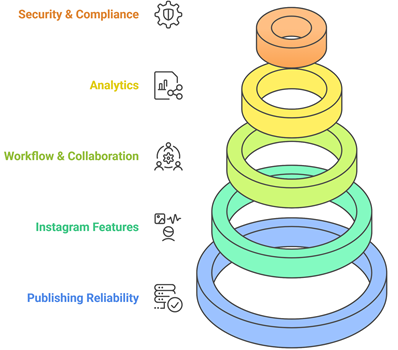
Our evaluation emphasized reliable Instagram workflows over the longest feature list. Official documentation, current plan pages, supported formats, team controls, and practical scheduling limits shaped the final selection.
- Publishing Reliability: We examined automatic delivery, notification fallbacks, queue controls, and failure visibility.
- Format Support: Reviews considered standard posts, carousels, Reels, Stories, and native-feature limitations.
- Planning Clarity: Calendars, previews, drafts, categories, and bulk preparation were compared for everyday usefulness.
- Team Safety: Roles, approvals, client separation, and individual logins were prioritized over shared credentials.
- Reporting Value: Analytics were judged by whether they could guide timing, format, and campaign decisions.
- Cost Reality: Free limits, trial terms, account charges, user seats, and billing cycles were checked together.
Instagram Scheduler Features That Matter in Daily Work
A scheduler becomes valuable when it removes friction without obscuring what will publish. Match capabilities to the volume, approval needs, and creative complexity of the Instagram account rather than paying for impressive options that remain unused.
- Clear Preview: Accurate previews expose cropping, sequencing, and destination mistakes before a post reaches followers.
- Format Choice: Confirm how posts, carousels, Reels, and Stories are handled, including notification-only cases.
- Queue Control: Reusable slots, pause options, and manual overrides keep automation responsive to changing campaigns.
- Approval Steps: Named reviewers and status controls reduce accidental publishing and unclear ownership.
- Asset Storage: Searchable media, caption drafts, hashtag groups, and templates shorten repeated preparation.
- Useful Analytics: Reports should connect timing and content decisions to measurable outcomes, not display decorative charts alone.
Business Gains from a Controlled Instagram Calendar
Scheduling creates leverage when it supports a repeatable business process. The goal is not to automate every interaction; it is to protect time for creative work, customer responses, and decisions that still need human judgment.
- Time Recovery: Batch preparation replaces repeated daily uploads, caption entry, and date selection.
- Steady Cadence: A visible calendar makes publishing gaps and excessive clusters easier to correct.
- Campaign Alignment: Product launches, events, email sends, and Instagram posts can share one coordinated timeline.
- Fewer Errors: Previews and approvals catch wrong profiles, unfinished captions, expired offers, and unsuitable media.
- Team Visibility: Status labels and assigned roles show who owns the next decision without long message threads.
- Learning Cycle: Scheduled experiments and recurring reports make successful formats easier to identify and repeat.
A Weekly Routine for Posts, Reels, and Stories
A dependable schedule starts before anything enters the calendar. Use a short weekly cycle that separates strategy, production, review, publishing, and measurement while leaving room for timely content and genuine audience interaction.
- Set Goals: Define the campaign purpose and the action each content format should encourage.
- Map Themes: Assign educational, promotional, community, and behind-the-scenes ideas across the week.
- Create Batches: Produce related visuals, video clips, covers, captions, and accessibility text together.
- Check Formats: Verify aspect ratios, duration, tags, music requirements, and any native-only Instagram elements.
- Approve Early: Give reviewers enough time to correct claims, dates, links, and brand details.
- Schedule Flexibly: Keep open space for announcements and pause evergreen queues when circumstances change.
- Review Results: Compare reach, engagement, saves, replies, and conversions with the original content goal.
Verdict:
The right choice depends on whether content reuse, team governance, or integrated design creates the greatest practical advantage. I would begin with the option that solves the current bottleneck and confirm account limits before paying for features intended for a much larger operation.
- SmarterQueue: Best for category-based queues and responsibly recycling evergreen content.
- Zoho Social: Best for businesses that need approvals, monitoring, and organized brand workspaces.
- Adobe Express: Best for creating branded assets and scheduling them from one visual workspace.
FAQs
Can an Instagram scheduler publish automatically?
Yes. Many schedulers can auto-publish eligible posts, carousels, Reels, and Stories after a supported account is connected. Some formats or native features still require a mobile notification and final action inside Instagram. Check the product’s current documentation for the exact account types, media rules, and Instagram elements supported by automatic publishing.
Are third-party Instagram scheduling tools allowed?
Scheduling tools are generally appropriate when they use authorized Instagram or Meta connection methods and follow current platform terms. Avoid services that request credentials through suspicious forms, automate prohibited engagement, or promise to bypass account restrictions. Use unique passwords, enable two-factor authentication, review connected apps regularly, and remove access from tools you no longer use.
Can I schedule Instagram Reels and Stories?
Many current platforms support Reels and Stories, but the workflow differs. Standard media may auto-publish, while content needing trending audio, stickers, polls, or other native additions may trigger a reminder so you can finish it in Instagram. Verify format dimensions, duration, cover-image controls, and whether the chosen plan includes the required publishing method.
Do I need an Instagram Business or Creator account?
A Professional account usually provides the most complete third-party publishing, analytics, and comment-management experience. Some schedulers now support Personal profiles through notifications or newer connection methods, but capabilities can be narrower. Review the tool’s account guide before switching profile types, and confirm whether a Facebook Page connection is still required for the features you intend to use.
Will scheduling improve Instagram engagement?
Scheduling can improve consistency, help teams test posting times, and protect time for audience replies, but it does not create reach by itself. Engagement still depends on relevant ideas, strong creative work, clear hooks, useful captions, community interaction, and appropriate formats. Treat scheduler analytics as feedback for experiments rather than a guarantee that one posting window will always perform best.