
Key Takeaway: A private Instagram account cannot be legitimately unlocked by entering a username into a random website. Among the tools reviewed, Peekviewer supports browser-based research, Spokeo adds public-record context, and mSpy fits only authorized device supervision. The dependable options are to request access, review information the owner has made public elsewhere, use public-data research tools, or monitor an account only through a device you own or are legally authorized to supervise. Never share an Instagram password, two-factor code, or suspicious download.
Searching for ways to view a private Instagram profile often leads to services that blur important distinctions. A browser viewer may organize public posts and stories, a people-search platform may connect a username with public records, and a parental-control app may capture activity after approved installation. None of those functions is the same as bypassing Instagram's follower approval system.
This guide separates realistic methods from misleading promises. It explains what seven widely discussed tools are designed to do, where each approach stops, and how to protect your account, device, and payment details. Product features and billing can change, so confirm current terms on the official site before subscribing and use every method with consent, a lawful purpose, and respect for the account owner's privacy.
Read moreRead less
Why Trust IGPrivateView?
Our evaluation distinguishes public-data tools from authorized device monitoring and checks each option for practical usefulness, privacy limits, and transparent billing.
- Tool Scope: Each product is classified by what it can actually access rather than by broad marketing language.
- Safety Review: Login requests, installation requirements, refund conditions, and common scam patterns are examined before a recommendation is made.
- Current Checks: Features, plan details, and limitations are compared with the latest information available from official product pages.
- Research Depth: Our broader testing covers 125+ social-media tools, 255+ research hours, and 55+ detailed guides and reviews.
- Clear Limits: Public viewers cannot reliably reveal follower-only posts, Close Friends stories, or private messages protected by Instagram.
- Full Disclaimer: This article is for educational and informational purposes only. Features, pricing, availability, privacy practices, and refund terms may change. Verify current details, terms, and privacy policies on official websites. Use monitoring software only on a device you own or are legally authorized to supervise, and follow applicable laws and Instagram's terms. Third-party data may be incomplete, delayed, or inaccurate. This article contains affiliate links that may earn us a commission at no extra cost to you.
Private Instagram Research Tools at a Glance
| Tool | Best for | Price or trial | Visit Site |
|---|---|---|---|
| Peekviewer | Browser-based Instagram research | $74.98 monthly; longer plans reduce the monthly rate | Visit Site |
| Spokeo | Username and identity context | Promotional 7-day access may be offered for $0.95 | Visit Site |
| Spynger | Authorized phone supervision | Pricing is displayed during checkout | Visit Site |
| xMobi | Cross-platform device monitoring | Plans and refund eligibility vary by checkout offer | Visit Site |
| mSpy | Parental controls and activity reports | Monthly plan commonly shown at $48.99; demo available | Visit Site |
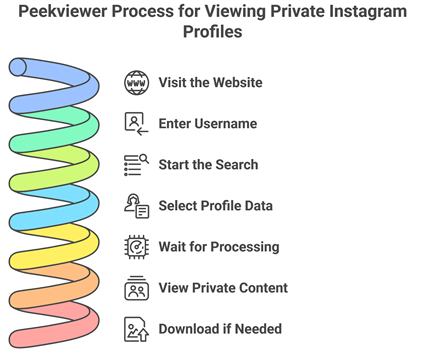
Method 1: Research an Instagram Account With Peekviewer
Peekviewer offers browser-based account research without requiring your personal Instagram login, but its results should be treated as retrieved or relayed content rather than a guaranteed privacy bypass.
- Choose Content: Select profiles, stories, posts, highlights, reels, followers, or tagged media from the available viewing options.
- Enter Carefully: Paste the exact profile URL or type the correct username so the search is not matched to a similarly named account.
- Create Access: Register for the service using an email address and review the selected subscription term before providing payment details.
- Wait Patiently: Public results may appear quickly, while the company says some limited-visibility profiles can take substantially longer to process.
- Verify Results: Compare names, profile photos, biographies, and timestamps because collected material may be delayed, partial, or associated with the wrong handle.
- Respect Ownership: Use displayed content for lawful personal research and do not republish, sell, harass, or impersonate the person shown.
1) Peekviewer
Peekviewer is an account-viewing service that runs in a web browser and does not ask for your Instagram username or password. Its workspace is designed to organize available posts, stories, highlights, comments, follower information, and tagged media. The company also advertises delayed retrieval for certain limited-visibility profiles, so results are not necessarily immediate or complete.
The dashboard is most useful when you need several content types in one place and want to revisit material after the original story or post changes. I found its four-step setup easier to follow than survey-gated viewers. Still, treat any private-profile claim cautiously, use the refund window to verify performance, and never assume the service can access direct messages.
Features
- Browser Dashboard: Peekviewer combines available profile details, grid posts, stories, reels, highlights, comments, and tagged media in one web workspace. It works across common phones and computers without installing an APK on your own device. Results depend on what its network can retrieve, so a polished dashboard should not be mistaken for guaranteed access to every account.
- Anonymous Stories: The service is designed to play available Instagram stories without placing your personal account in the creator's viewer list. This can support public-profile research or quiet trend monitoring. Story availability can change when Instagram updates its systems, and content shared only with approved followers or Close Friends should never be assumed to load consistently or reliably.
- Saved History: Peekviewer says accessed posts and stories can remain in a private user space for up to three months. That makes it easier to revisit material after it disappears from the live profile. Saving a copy does not transfer copyright or consent, so archived media should remain private unless the creator authorizes broader use. Use restraint.
- Profile Signals: Available follower, following, like, comment, and tagged-photo information can add context beyond a profile's main grid. Researchers may use those signals to identify partnerships or activity changes over time. Numbers can lag behind Instagram or reflect only partial collection, so important conclusions should be checked against a second reliable source when stakes are high online.
- Download Options: Photos, videos, reels, and stories that appear in the dashboard may be downloaded in their available quality for personal reference. In my checks, the centralized storage reduced repeated profile searches. Downloads should not be used to repost restricted material, build harassment archives, or distribute somebody else's content without clear, specific authorization directly from the creator.
- Billing Choices: Monthly, three-month, and annual billing terms provide different effective monthly costs, while the advertised refund policy has eligibility conditions. Compare the total amount charged, renewal date, and cancellation procedure before paying. A lower long-term monthly rate may still require a much larger upfront commitment than a single-month plan. Base decisions on the full commitment amount.
How to Use Peekviewer
- Choose the Instagram content type you want to research and create a Peekviewer account.
- Enter the exact username or profile URL, then select the account type and subscription term.
- Review the retrieved profile carefully and verify names, dates, and media before relying on a result.
| Pros | Cons |
| Works in a browser without requiring your personal Instagram credentials. | Limited-visibility account retrieval may be delayed or incomplete. |
| Combines multiple available content types in one organized dashboard. | Longer discounted plans require a larger upfront commitment. |
| Offers several billing periods and a published refund process. |
Pricing
- 1 month: $74.98
- 3 months: $44.99 per month
- 12 months: $18.74 per month
- Advertised refund period: 14 days, subject to the policy terms
Link: peekviewer.com
Method 2: Use Public Research or Authorized Monitoring Tools
The next six services fall into three different categories, so choose by purpose rather than assuming every product is a private-profile viewer.
- Identity Research: Spokeo can connect a username with possible public records and social profiles, but it cannot reveal follower-only Instagram posts.
- Phone Monitoring: Spynger, xMobi, and mSpy require authorized setup on a compatible device before they can report Instagram activity.
- Public Viewing: Inflact displays and downloads content from public profiles without requiring an Instagram account for basic searches.
- Activity Reports: Snoopreport analyzes publicly available follows, unfollows, likes, and interests rather than opening a private feed.
- Consent First: Device-level tools should be limited to a phone you own or are legally permitted to supervise, with appropriate notice.
- Terms Matter: Review supported devices, renewal rules, cancellation steps, and refund exclusions before starting any paid plan.
2) Spokeo
Spokeo is a people-search service, not a tool for opening private Instagram posts. A username, email address, phone number, name, or address can lead to possible public records and social-profile matches. This is useful for checking whether an account may connect to a broader online identity, although similar names and reused handles can produce uncertain associations.
Reports may include contact details, address history, relatives, aliases, and social links compiled from many sources. I found the username search helpful for organizing scattered clues, not for proving ownership. Spokeo is intended for personal research and is not a consumer-reporting agency, so do not use it for employment, housing, credit, insurance, or other regulated decisions.
Features
- Username Search: Spokeo can search an online handle across public sources and return possible social profiles connected with that name. This helps when an Instagram username is your only starting clue. A shared or recycled handle may belong to different people, so match photos, locations, ages, and details before treating a result as accurate or contacting anyone.
- Identity Context: Possible names, aliases, approximate ages, locations, relatives, and contact records can provide context around an unfamiliar account. Those fields come from aggregated sources rather than Instagram's private database. Records may be old, incomplete, or mixed with another person, making independent confirmation essential before contacting anyone, drawing a sensitive conclusion, or acting carefully on the findings.
- Social Links: Reports may surface public social-network pages associated with an email address or username, allowing a researcher to compare profile photos and biographical clues across platforms. This approach can reveal a digital footprint, but it does not bypass follower approval, reveal Close Friends stories, or expose direct messages inside a private Instagram account under any plan.
- Private Searches: Spokeo states that searches are confidential and the person being researched is not notified. In my review, this made it practical for a preliminary identity check without interacting with the account. Confidentiality does not remove the need for a lawful purpose, careful verification, and respectful handling of any personal information returned after the report arrives.
- Report Updates: Some purchased reports can change as new public information enters Spokeo's data sources. Updated results may help with a long-running personal search, but they should not be confused with real-time Instagram monitoring. The service does not guarantee that every record is current, complete, or connected to the correct social-media user unless sources are checked regularly.
- Billing Terms: Spokeo may present a low-cost introductory report or trial that automatically renews into a monthly membership unless canceled on time. Read the checkout disclosure, renewal price, report limits, and add-on fees before paying. Save the confirmation and cancellation record, because the promotional price may renew at a higher monthly rate than many users initially expect.
How to Use Spokeo
- Start with the Instagram username, email, phone number, name, or address you already know.
- Compare possible matches using photos, locations, aliases, and age ranges instead of relying on one field.
- Open a report only for a lawful personal purpose and review renewal terms before paying.
| Pros | Cons |
| Searches several identifiers, including usernames and email addresses. | Cannot display follower-only Instagram posts or private messages. |
| Can organize possible public records and social-profile connections. | Aggregated records may be outdated, incomplete, or linked to the wrong person. |
| Searches are designed to remain confidential. |
Pricing
- Basic preliminary results may appear without charge
- Promotional 7-day access may be offered for $0.95
- Trial offers may renew automatically at the displayed monthly rate
Link: spokeo.com
3) Spynger
Spynger is a phone-monitoring product designed to report activity from a compatible device after installation and permission setup. Depending on the platform and configuration, its dashboard can cover social apps, messages, calls, locations, and browsing activity. It is not a username-only Instagram viewer and cannot obtain device data merely because you know somebody's profile handle.
The product fits a narrow use case: supervising a device you own or are legally authorized to monitor. I found the web dashboard easier to evaluate when separating each data category from the Instagram-specific claims. Operating-system changes, security settings, and app versions can reduce coverage, so confirm compatibility and applicable consent requirements before purchasing or installing anything.
Features
- Instagram Activity: After authorized installation, Spynger is designed to capture supported Instagram interactions from the monitored phone and organize them in an online account. The exact messages, media, or notifications available depend on the device and permissions. It cannot remotely open a private profile by username, and unsupported operating-system changes may interrupt collection for the selected device.
- Message Records: Supported configurations may report text from social applications along with timestamps and contact details visible on the supervised device. This can help a parent investigate safety concerns on a family-owned phone. Encrypted apps, disappearing content, notification settings, and platform updates can limit completeness, so the dashboard should not be treated as a complete, reliable transcript.
- Media Capture: Images, videos, screenshots, or attachments may appear when the phone and selected installation method support those data types. Media monitoring can expose highly personal material, making narrow settings and secure account access especially important. Collect only what serves the authorized safety purpose, restrict dashboard access, and delete retained copies when they are no longer needed.
- Device Location: Location reporting can show the supervised phone's recent position and movement history when location services and permissions remain enabled. In my assessment, this feature is more relevant to device safety than to Instagram research. Accuracy varies indoors, in weak-signal areas, and when battery-saving settings, disabled services, or deliberate location sharing restrict reliable background updates significantly.
- Remote Dashboard: Collected information is presented through a browser dashboard, letting an authorized account holder review categories without repeatedly handling the supervised phone. Protect that portal with a unique password and every available security control. Anyone who gains access could see sensitive communications, locations, and media, so shared credentials create a serious privacy risk within the household.
- Setup Limits: Initial installation normally requires physical access, compatible software, and the permissions described by the vendor. iPhone and Android coverage may differ, while advanced features can require extra configuration. Avoid instructions that tell you to defeat security safeguards on a device you do not control, and verify whether visible notice is legally required in your location.
How to Use Spynger
- Confirm that you own or are legally authorized to supervise the compatible phone.
- Create an account, select a plan, and follow the vendor's supported installation and permission steps.
- Secure the dashboard and review only the data needed for the authorized safety purpose.
| Pros | Cons |
| Combines supported social, message, location, and browsing records. | Requires authorized device access and compatible configuration. |
| Centralizes available device activity in a browser dashboard. | Coverage can change with operating-system, permission, or app updates. |
| Publishes a refund route for eligible technical problems. |
Pricing
- Plan pricing is shown during checkout and may vary by term
- A 30-day refund policy is advertised with eligibility conditions
- Confirm device compatibility before purchasing
Link: spynger.com
4) xMobi
xMobi is an account-based monitoring service that collects supported information from a phone after it has been configured with the necessary access. Instagram coverage may include notifications, messages, or on-device activity, while the broader dashboard can organize calls, locations, browser history, and other app data. Coverage depends heavily on the operating system and installation method.
This is a device-supervision product rather than a web viewer for arbitrary private accounts. I found that distinction essential when comparing its marketing with anonymous browser tools. Use xMobi only where you own the phone or have clear legal authority and appropriate consent, and verify the current feature list for the exact Android or iPhone model before paying.
Features
- Social Monitoring: xMobi groups supported social-app information collected from the supervised phone into a remote dashboard. Instagram visibility can depend on notifications, permissions, application versions, and the selected setup. It does not derive private posts from a username alone, and changes made by Instagram or the phone manufacturer can reduce what appears after installation during routine operation.
- Message Context: Available records may include conversation text, contacts, timestamps, and shared media captured from compatible applications. That context can help investigate a specific safety concern on an authorized device. Deleted, encrypted, or disappearing messages may not be recovered reliably, and collected fragments should be interpreted carefully rather than assumed to represent an entire conversation or intent.
- Location History: When permissions remain active, xMobi can report the phone's location and recent movement through its online account. This supports device recovery or agreed family supervision, not private-profile viewing. Location readings can be delayed or imprecise from GPS conditions, network coverage, power-saving modes, permission changes, or device being switched off, so confirm important decisions independently and carefully.
- Web Records: Browser history and selected online activity may be displayed alongside communications and social data, depending on the device. In my review, this wider context was useful for separating an Instagram concern from general browsing behavior. Incognito sessions, privacy settings, unsupported browsers, and operating-system protections can leave gaps that the dashboard cannot reconstruct or recover later.
- Account Alerts: A centralized panel can make new records easier to review without opening every application on the supervised phone. Update frequency is not the same as real-time certainty, because syncing depends on connectivity, battery state, and background permissions. Treat delayed or missing entries as a technical limitation rather than evidence that no activity occurred between syncs.
- Installation Needs: The service requires compatible hardware, an account, and setup access described by the provider. Android and iOS installations can expose different features, and some configurations need additional credentials or recurring permission checks. Do not install it secretly on an adult's device or use setup guidance to circumvent security controls without lawful authorization, documented consent, and notice.
How to Use xMobi
- Check the exact phone model, software version, ownership, consent, and legal authority.
- Choose a subscription and complete only the setup steps approved for that device.
- Review synchronized records in the online panel and investigate missing data as a technical limitation.
| Pros | Cons |
| Covers several device-data categories from one account. | Does not reveal a private Instagram feed from a username alone. |
| Supports remote review after authorized setup. | Available records depend heavily on device permissions and software support. |
| Provides term-based plans and a conditional refund policy. |
Pricing
- Checkout offers can vary by subscription length
- A 14-day refund policy may apply under stated conditions
- Review automatic-renewal and cancellation terms before paying
Link: xmobi.co
5) mSpy
mSpy is a parental-control and device-monitoring platform that reports supported activity after configuration on a compatible phone. Its dashboard can combine social-app records with calls, text messages, locations, browser history, and alerts. The product is not a remote Instagram account opener; meaningful coverage requires authorized access to the device, account credentials, or both during setup.
Parents may use the service to supervise a family-owned phone under applicable laws and household rules. I found the online demo helpful for understanding the dashboard before choosing a plan. Feature depth differs between Android and iOS, while encrypted apps and system updates can create gaps, so compatibility should be checked for the specific device rather than assumed.
Features
- Social Records: mSpy can present supported social-app messages, contacts, media, and timestamps captured from the supervised phone. Availability varies by operating system, application version, permissions, and installation type. It cannot reveal another person's private Instagram feed from a username, and some encrypted or disappearing interactions may never appear in the dashboard reliably under the current operating conditions.
- Keyword Alerts: Selected configurations can notify an account holder when monitored text includes specified words or phrases. This may help a parent focus on credible risks instead of reading every conversation. Alerts can miss slang, images, voice notes, or unsupported apps, and broad keyword lists may generate false alarms that require calm, contextual review before any response.
- Location Tools: GPS reporting, geofences, and movement history can support agreed family safety routines when the device grants location access. These tools are separate from Instagram monitoring and should be configured narrowly. Readings may drift, arrive late, or stop when permissions, connectivity, battery settings, or location services change, so emergency decisions need independent confirmation from another source.
- Web Dashboard: The online control panel organizes different data categories and can be opened from another authorized device. In my assessment, the demo made navigation and report grouping easy to understand before purchase. Because the account may contain private conversations and locations, use a unique password, enable available protections, and never share dashboard access casually within families.
- Device Coverage: Android and iPhone setup paths offer different levels of visibility, with some features requiring physical access, credentials, backups, or advanced configuration. Check the current compatibility page for the exact model and software version. A feature listed for one platform should not be assumed to work identically on another platform or following later major operating-system updates.
- Usage Reports: Calls, contacts, browser history, application use, and supported messages can provide a wider picture of activity on the supervised device. More data is not automatically better: define a specific safety purpose, collect the minimum needed, discuss expectations where appropriate, and remove retained information when the concern has been resolved according to a documented retention schedule.
How to Use mSpy
- Use the online demo and compatibility information to confirm that the needed features support the phone.
- Purchase the appropriate term and complete authorized setup on the family-owned or supervised device.
- Protect the control panel, configure narrow alerts, and retain only information relevant to the safety concern.
| Pros | Cons |
| Provides a working demo before purchase. | Useful access requires authorized setup on a compatible device. |
| Combines social-app records with location, calls, and web activity. | Android and iOS feature coverage can differ substantially. |
| Offers keyword alerts and geofencing on supported configurations. |
Pricing
- 1-month plan is commonly displayed at $48.99
- Longer terms may reduce the effective monthly price
- An interactive online demo is available
Link: mspy.com
6) Inflact
Inflact offers an anonymous Instagram profile viewer for content that is publicly accessible. A basic search does not require an Instagram login, and the service can display public profiles, posts, stories, and downloadable media within daily limits. Its own materials state that private-account access is not permitted, making the product useful for public research rather than follower-only content.
The free tier suits occasional checks, while premium access raises viewing limits and adds tracking or analytics features. I found the public-only statement clearer than the ambiguous promises made by many viewer sites. Inflact still relies on Instagram availability, so a profile can fail to load, appear incomplete, or become inaccessible when the account changes privacy settings.
Features
- Public Profiles: Inflact's viewer displays content from public Instagram accounts without requiring your personal account to follow or open the profile. It can help with creator research, brand checks, or casual browsing. The service explicitly limits access to public information, so it will not reveal posts, stories, followers, or messages protected by private-account approval under any plan.
- Anonymous Stories: Available stories can be viewed without placing your Instagram username in the creator's normal viewer list because the search does not use your personal login. This is useful for public competitive research. Availability may vary with Instagram changes, and anonymous viewing does not grant permission to copy, republish, harass, or impersonate the account owner online.
- Media Downloads: Public photos, videos, reels, and stories can be saved when the selected item is accessible through the viewer. Downloading supports offline reference or authorized content management, but copyright remains with the creator. Do not remove attribution, redistribute protected material, build commercial archives, or use saved media beyond the permissions granted by its creator or owner.
- Daily Limits: Free use includes a limited number of profile searches, content views, and downloads per day, while premium access expands those allowances. In my testing notes, the limits were clear enough for occasional research. Heavy users should compare the premium cost with Instagram's official tools and confirm exactly which analytics are included for frequent ongoing use.
- Profile Analytics: Premium features may track public follower changes, likes, comments, and stories for selected profiles. These observations help with marketing or creator analysis, but they remain dependent on publicly visible data and collection intervals. Reports can miss short-lived changes, private interactions, or material removed before the service captures it, so trends need context before final interpretation.
- Multi-Device Use: Because the viewer runs online, it can be opened from common desktop and mobile browsers without installing an unknown application. That lowers software risk on your device, although the website still processes searches and may set cookies. Review its privacy policy, avoid entering Instagram credentials, and close downloaded files carefully on shared computers when finished.
How to Use Inflact
- Open the profile viewer and enter the exact username of a public Instagram account.
- Review available posts, stories, or profile analytics within the daily allowance.
- Upgrade only if higher limits are useful, and download media solely for an authorized purpose.
| Pros | Cons |
| Offers a free tier for limited public-profile research. | Works with public accounts only. |
| Does not require an Instagram login for basic viewer searches. | Free searches, views, and downloads are limited. |
| Supports public-media viewing, downloads, and profile analytics. |
Pricing
- Free tier: $0 with daily limits
- Premium viewer: approximately $7.80 per month for one profile
- Public accounts only
Link: inflact.com
7) Snoopreport
Snoopreport is a cloud-based Instagram activity tracker that builds reports from publicly available information. It focuses on likes, follows, unfollows, activity patterns, interests, and summaries for selected public accounts. No application is installed on the observed person's phone, and the service does not require access to their Instagram credentials, but it cannot open a private feed.
Reports arrive weekly or monthly and are intended to make public activity easier to review than manual checking. I found the product's narrow focus easier to assess than tools promising every type of Instagram access. Results are analytical estimates based on collected public signals, so missing likes, delayed follow changes, or incorrect interest summaries remain possible.
Features
- Like Tracking: Snoopreport organizes publicly observable likes on photos and reels into periodic reports for a selected public account. This can reveal recurring topics or creators without manually checking numerous posts. Instagram does not expose every interaction consistently, so the report may be incomplete and should not be treated as a definitive record of everything a person liked.
- Follow Changes: Recent follows and unfollows can be grouped into a timeline that is easier to scan than repeatedly comparing profile lists. This supports public competitor research or interest analysis. Instagram may reorder, hide, or limit follower data, and private accounts remain outside the product's stated public-data model, so some changes can still be delayed or missed.
- Interest Summaries: The service uses collected likes, follows, hashtags, and activity patterns to generate summaries about possible interests or habits. These are interpretations, not verified facts about the individual. Avoid using an automated profile to make sensitive judgments, confront somebody, or infer health, politics, relationships, or other private characteristics that the available evidence does not establish reliably.
- Activity Timing: Reports may show periods when the selected public account appears most active based on observed interactions. In my assessment, this is more useful for broad trend analysis than precise surveillance. Collection intervals, time zones, missing events, and scheduled posts can distort patterns, so the displayed timeline should be read as an estimate over several periods.
- Cloud Reports: Tracking runs through Snoopreport's online service and does not require installing software on the observed person's device. That simplifies setup and reduces device-level intrusion, but the system is limited to information it can collect publicly. The account being researched must be suitable for tracking, and unavailable or private profiles will not yield comprehensive activity reports.
- Plan Options: Snoopreport currently lists monthly plans by account limit, with separate options that add AI-generated interest summaries. Check how many profiles the selected plan covers and whether billing renews automatically. The lowest standard plan tracks up to two accounts, while business tiers expand capacity; cancel unused tracking and retain confirmation of account or billing changes.
How to Use Snoopreport
- Create an account and choose a plan that covers the number of public profiles you need.
- Add an eligible public Instagram username and allow time for the service to collect observable activity.
- Read weekly or monthly reports as estimates and cross-check important patterns before acting on them.
| Pros | Cons |
| Requires no installation on the observed person's phone. | Cannot open private accounts or guarantee complete activity coverage. |
| Organizes public likes, follows, and interest patterns into reports. | Reports may lag or infer interests from incomplete public signals. |
| Offers plan sizes for personal and business research. |
Pricing
- Personal: $4.99 per month for up to 2 accounts
- Personal + AI Summary: $6.99 per month for up to 2 accounts
- Business plans increase account limits and monthly pricing
Link: snoopreport.com
Detailed Tool Capability Comparison
| Tool | Public content | Identity research | Authorized device data | Reports or history | Visit Site |
|---|---|---|---|---|---|
| Peekviewer | Yes | Limited profile context | No | Up to three months advertised | Visit Site |
| Spokeo | Public social links | Yes | No | Saved and updated reports may be available | Visit Site |
| Spynger | Only through supervised device | No | Yes | Dashboard history depends on setup | Visit Site |
| xMobi | Only through supervised device | No | Yes | Dashboard history depends on setup | Visit Site |
| mSpy | Only through supervised device | No | Yes | Dashboard reports and alerts | Visit Site |
Method 3: Find Public Traces With Search Engines
A search engine cannot enter a private Instagram feed, but it may reveal public pages, quoted captions, old references, or images that were indexed before an account changed its visibility.
- Exact Username: Search the handle in quotation marks to reduce unrelated results and reveal matching pages on other websites.
- Site Filter: Combine the username with
site:instagram.comto focus results on public Instagram pages that the search engine indexed. - Image Search: Use a public profile photo or known image to locate authorized reposts, interviews, portfolios, or alternate accounts.
- Name Variants: Try the person's display name, common nickname, brand name, and city because handles often change while references remain indexed.
- Date Clues: Add an event, workplace, school, campaign, or year to narrow results without collecting unrelated information about similar names.
- Result Limits: Treat snippets and cached references cautiously, since they may be stale, removed, or associated with a different person.
Method 4: Send a Follow Request That Feels Trustworthy
The only dependable way to see follower-only posts and stories without authorized device access is to let the account owner decide whether to approve your genuine Instagram profile.
- Use Identity: Send the request from your real or clearly identified account so the recipient understands who wants access.
- Complete Profile: Add a recognizable photo, accurate bio, and a few normal posts before requesting access from someone who may not know you.
- Explain Context: If appropriate, send one polite message describing the genuine connection or reason for the request without demanding approval.
- Avoid Pressure: Do not send repeated requests, contact the person across many platforms, or ask mutual friends to pressure them.
- Allow Time: Some people review requests infrequently, while others intentionally accept only friends, relatives, colleagues, or verified customers.
- Respect Refusal: A declined or unanswered request is a privacy decision, not a problem that another tool is entitled to defeat.
Method 5: Check Mutual Connections and Public Mentions
When direct access is unavailable, public posts from other people and platforms can confirm basic identity or context without impersonation, account intrusion, or pressure.
- Mutual Friends: Ask a trusted mutual contact for an introduction, but do not request screenshots of material the account owner chose to restrict.
- Tagged Posts: Search public posts that tag the username, remembering that a tag can be mistaken, old, or added without approval.
- Public Mentions: Look for interviews, event pages, brand partnerships, or creator credits that the person or organization shared publicly.
- Other Platforms: Check whether the same verified identity maintains public profiles on TikTok, Facebook, LinkedIn, YouTube, X, or a personal site.
- Handle Matching: Compare photos, names, locations, and linked websites instead of assuming identical usernames always belong to one person.
- No Impersonation: Avoid fake profiles, stolen photos, fabricated biographies, or deceptive messages designed to obtain access under false pretenses.
What Private Instagram Viewers Can and Cannot Show
The label “private Instagram viewer” covers several unrelated products, and understanding the underlying data source is the fastest way to spot an impossible promise.
- Public Profiles: Legitimate web viewers can organize biographies, profile photos, posts, stories, reels, and comments that Instagram exposes publicly.
- Public Records: People-search tools may connect a handle with possible social pages or records, but they do not open follower-only media.
- Device Data: Monitoring apps can report supported activity only after lawful setup on a compatible phone, not from a remote username search.
- Private Posts: A website cannot reliably promise instant access to every post protected by the account owner's follower approvals.
- Close Friends: Stories restricted to a selected audience remain unavailable unless the viewing account was explicitly included by the creator.
- Direct Messages: Browser viewers and public-data services cannot legitimately reveal private conversations stored inside another person's Instagram account.
- Deleted Media: A service may retain content captured earlier, but it cannot guarantee recovery of items it never collected before deletion.
Legal and Ethical Boundaries to Keep in Mind
Privacy, computer-access, interception, stalking, copyright, and consent rules vary by location, so the safest approach is to use public information or clearly authorized access for a narrow purpose.
- Obtain Consent: Get clear permission before installing monitoring software or accessing another adult's device, accounts, backups, or credentials.
- Own Devices: Limit parental-control software to phones you own or are legally authorized to supervise under applicable rules.
- Follow Terms: Instagram may restrict scraping, automated access, impersonation, credential sharing, and other behavior even when information appears online.
- Limit Collection: Gather only information necessary for the legitimate purpose and avoid indefinite archives of somebody else's activity.
- Protect Records: Secure dashboards, exports, screenshots, and downloads because they can contain sensitive personal information about multiple people.
- Seek Advice: Consult a qualified local professional when monitoring, evidence collection, workplace use, or child-safety duties create legal uncertainty.
Warning Signs of a Fake Instagram Viewer
Fraudulent viewer sites often use staged progress bars and urgent promises to push visitors toward credential theft, subscriptions, downloads, or endless “verification” offers.
- Password Request: Leave immediately if an unofficial service asks for your Instagram password, backup codes, or two-factor authentication code.
- Survey Loop: Repeated questionnaires, app installs, or offers usually generate affiliate revenue without delivering the promised private content.
- Fake Progress: A generic “connecting” animation that behaves identically for every username is not evidence that account data was found.
- Unknown Download: Avoid APK files, browser extensions, and desktop programs from publishers whose identity, permissions, and security record cannot be verified.
- Hidden Billing: Read trial renewal terms, total charges, refund exclusions, and cancellation instructions before entering card or wallet information.
- No Limits: Be skeptical when a service promises instant access to every private account, message, Close Friends story, and deleted post.
Verdict:
No single product legitimately unlocks every private Instagram profile. Choose a tool only when its real data source matches your lawful goal, verify current terms before paying, and prefer a genuine follow request whenever you need access to follower-only posts or stories.
- Peekviewer is the strongest fit for browser-based Instagram research without using your personal Instagram login.
- Spokeo is useful when a username must be checked against possible public records and social-profile connections.
- mSpy suits parental supervision on a compatible device you own or are legally authorized to monitor.
FAQs
Can any website show every private Instagram profile?
No. A reputable public viewer cannot guarantee instant access to follower-only posts, Close Friends stories, or private messages. Some services display public content, relay material accessible to consenting users, or collect activity from an authorized device. Those models have different limits and should not be described as universal privacy bypasses.
Can search engines display content from a private Instagram account?
A search engine may retain a snippet, thumbnail, repost, or public reference that was indexed earlier, especially if the account was once public. It does not enter the current private feed. Treat old results cautiously because they may be stale, removed, misattributed, or disconnected from the account's present identity.
Can I rely on screenshots shared by another person?
A screenshot can show only what the sender captured at that moment. It may be cropped, edited, outdated, or missing surrounding context, and sharing it may violate the account owner's expectations. Use screenshots as limited clues rather than proof, and do not pressure an approved follower to redistribute restricted material.
How long does an Instagram follow request take?
Instagram does not impose an approval deadline. The person may accept within minutes, review requests days later, leave the request pending, or decline it. A complete and recognizable profile can improve trust, but repeated requests or messages may feel intrusive and will not create a right to access private content.
What should I do after giving a viewer my Instagram password?
Change the Instagram password immediately, sign out unfamiliar sessions, enable two-factor authentication, and secure the connected email account. Remove unknown linked apps and review recent login activity. If access is already lost, use Instagram's official recovery flow. Contact your payment provider promptly if you also entered card information.
Where can I report a fake private-profile viewer?
Report the ad to the platform that displayed it, flag phishing or malware through your browser's safety tools, and notify the site's hosting provider when appropriate. Report unauthorized charges to your payment provider. For identity theft, extortion, or substantial financial loss, contact the relevant consumer-protection or law-enforcement agency in your country.


